Question Types
All questions in a surveydown survey are created using the sd_question() function. Calls to sd_question() should be put inside code chunks in the survey.qmd file to define the survey questions.
The function requires the following three arguments:
-
id: A unique identifier for the question, which will be used as the variable name in the resulting survey data. -
label: The label that will be displayed on the question in the survey. -
type: The type of question.
Many question types also require an option argument, which is a named vector of options for the question (e.g. for multiple choice questions). The function also includes many other optional arguments that can be used to customize the question appearance and behavior. See the package documentation for more details.
Below are examples of each question type.
text
Use type = 'text' to specify a text input type question.
```{r}
sd_question(
  type  = "text",
  id    = "word",
  label = "Write a word:"
)
```
textarea
Use type = 'textarea' to specify a text area input type question.
```{r}
sd_question(
  type  = "textarea",
  id    = "paragraph",
  label = "Write a paragraph:"
)
```
numeric
Use type = 'numeric' to specify a numeric input type.
```{r}
sd_question(
  type  = 'numeric',
  id    = 'age',
  label = "What's your age?"
)
```
mc
Use type = 'mc' to specify a multiple choice type question with a single choice option.
```{r}
sd_question(
  type   = 'mc',
  id     = 'artist',
  label  = "Which artist do you prefer most from this list?",
  option = c(
    "Taylor Swift" = "taylor_swift",
    "Beyoncé"      = "beyonce",
    "Adele"        = "adele",
    "Rihanna"      = "rihanna",
    "Lady Gaga"    = "ladygaga",
    "Ed Sheeran"   = "ed_sheeran",
    "Drake"        = "drake"
  )
)
```
mc_multiple
Use type = 'mc_multiple' to specify a multiple choice type question with multiple selection enabled.
```{r}
sd_question(
  type  = 'mc_multiple',
  id    = 'swift',
  label = "What are your favorite Taylor Swift albums (select all that apply)?",
  option = c(
    "Taylor Swift (2006)" = "taylor_swift",
    "Fearless (2008)"     = "fearless",
    "Speak Now (2010)"    = "speak_now",
    "Red (2012)"          = "red",
    "1989 (2014)"         = "1989",
    "Reputation (2017)"   = "reputation",
    "Lover (2019)"        = "lover",
    "Folklore (2020)"     = "folklore",
    "Evermore (2020)"     = "evermore",
    "Midnights (2022)"    = "midnights"
  )
)
```mc_image
Use type = 'mc_image' for a single-choice question where each option is a clickable image card. Provide an image argument: a vector of image paths or URLs, one per option, in the same order as option. Paths are used directly in the image src, so they should resolve against your survey’s images or www folder (e.g. "images/cat.png") or be full URLs.
NoteCaptions are optional
For image-choice questions, the option names control whether a text caption appears beneath each image:
-
With captions - give your options names, e.g.
option = c('Cat' = 'cat', 'Dog' = 'dog'). The names (“Cat”, “Dog”) are shown as captions; the values (“cat”, “dog”) are stored in your data. -
Without captions (images only) - pass an unnamed vector, e.g.
option = c('cat', 'dog'). No captions are shown, and the values (“cat”, “dog”) are still stored in your data.
This is different from the other multiple choice types, where an unnamed option vector uses the values as the visible labels. For image questions an unnamed vector means “no caption”.
Note
This widget only renders well in a Shiny environment, so we just show a screenshot here.
With captions:

```{r}
sd_question(
  type   = 'mc_image',
  id     = 'pet',
  label  = "Which pet do you prefer?",
  option = c('Cat' = 'cat', 'Dog' = 'dog'),
  image  = c('images/cat.png', 'images/dog.png')
)
```
Without captions (unnamed option, images only):

```{r}
sd_question(
  type   = 'mc_image',
  id     = 'pet_no_caption',
  label  = "Which pet do you prefer?",
  option = c('cat', 'dog'),
  image  = c('images/cat.png', 'images/dog.png')
)
```
mc_multiple_image
Use type = 'mc_multiple_image' for the multiple-selection version of mc_image, where respondents can select more than one image card.
Note
This widget only renders well in a Shiny environment, so we just show a screenshot here.
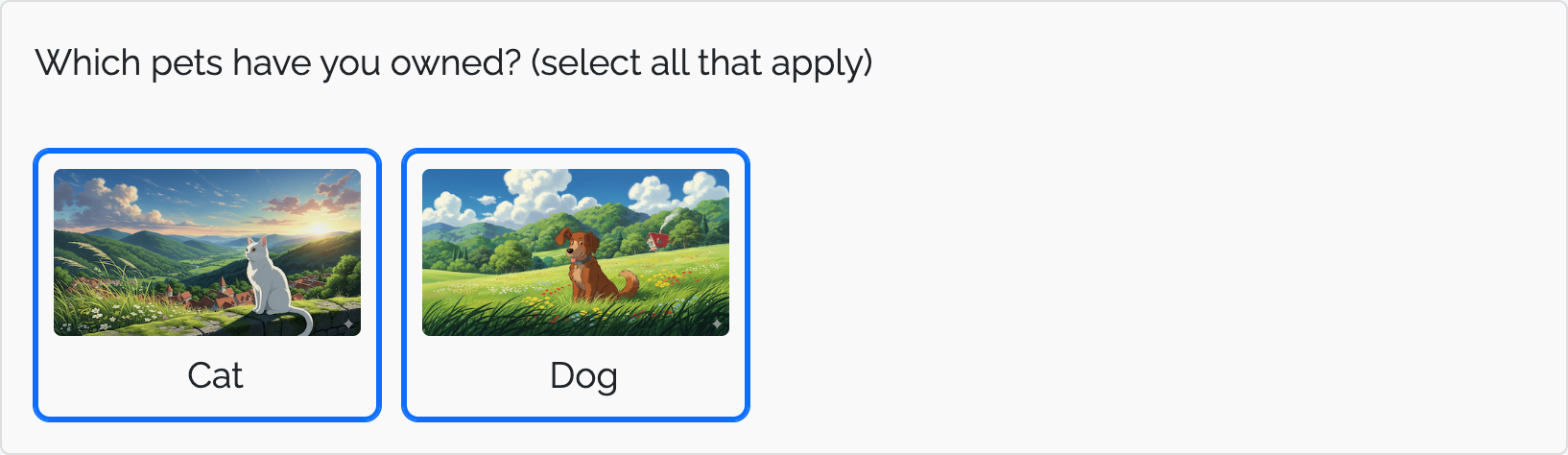
```{r}
sd_question(
  type   = 'mc_multiple_image',
  id     = 'pets_owned',
  label  = "Which pets have you owned? (select all that apply)",
  option = c('Cat' = 'cat', 'Dog' = 'dog'),
  image  = c('images/cat.png', 'images/dog.png')
)
```
select
Use type = 'select' to specify a drop down select type question.
```{r}
sd_question(
  type  = 'select',
  id    = 'education',
  label = "What is the highest level of education you have attained?",
  option = c(
    "Did not attend high school" = "hs_no",
    "Some high school"           = "hs_some",
    "High school graduate"       = "hs_grad",
    "Some college"               = "college_some",
    "College"                    = "college_grad",
    "Graduate Work"              = "grad",
    "Prefer not to say"          = "no_response"
  )
)
```
slider
Note
This widget only renders well in a Shiny environment, so we just show a screenshot here.

```{r}
sd_question(
  type  = 'slider',
  id    = 'experience',
  label = "How would you rate your overall experience?",
  option = c(
    "Very poor" = "very_poor",
    "Poor"      = "poor",
    "Neutral"   = "neutral",
    "Good"      = "good",
    "Very good" = "very_good"
  ),
  selected = 'neutral'
)
```
slider_numeric
Note
This widget only renders well in a Shiny environment, so we just show a screenshot here.
If your slider uses numeric inputs, use the slider_numeric question type. This type of slider can be used for either single sliders or dual sliders that define a range of values.
Single slider:

```{r}
sd_question(
  type = "slider_numeric",
  id = 'slider_single_val',
  label = 'Single value example',
  option = seq(0, 10, 1)
)
```
Range slider:

```{r}
sd_question(
  type = "slider_numeric",
  id = 'slider_range',
  label = 'Range example',
  option = seq(0, 10, 1),
  default = c(3, 5)
)
```
date
Use type = 'date' to specify a date input type. The date value will be today’s date by default. Upon clicking on the text box, you are provided with a date dialog box to choose date from.
Note
This widget only renders well in a Shiny environment, so we just show a screenshot here.

```{r}
sd_question(
  type  = 'date',
  id    = 'dob',
  label = "What is your date of birth?"
)
```
daterange
Use type = 'daterange' to specify a date range input type.
Note
This widget only renders well in a Shiny environment, so we just show a screenshot here.

```{r}
sd_question(
  type  = 'daterange',
  id    = 'hs_date',
  label = "When did you start and finish high school?"
)
```
matrix
Use type = 'matrix' to specify a matrix input type.
| Disagree | Neutral | Agree | |
|---|---|---|---|
| I would buy a gasoline car. | |||
| I would buy an EV. | |||
```{r}
sd_question(
  type   = "matrix",
  id     = "car_preference",
  label  = "Please indicate your agreement with the following statements.",
  row    = c(
    "I would buy a gasoline car." = "buy_gasoline",
    "I would buy an EV."          = "buy_ev"
  ),
  option = c(
    "Disagree" = "disagree",
    "Neutral"  = "neutral",
    "Agree"    = "agree"
  )
)
```
matrix_multiple
Use type = 'matrix_multiple' to specify a matrix input type where each row allows multiple selections (checkboxes) instead of a single selection (radio buttons).
Each row becomes its own sub-question with the ID <question_id>_<row_id>, stored as a separate column in the resulting data. Multiple selections within a row are stored as a single pipe-separated string (e.g., "online|app"), just like the mc_multiple type.
| In store | Online | Mobile app | |
|---|---|---|---|
| Groceries | |||
| Electronics | |||
```{r}
sd_question(
  type   = "matrix_multiple",
  id     = "purchase_channels",
  label  = "How have you purchased each of the following? (select all that apply)",
  row    = c(
    "Groceries"   = "groceries",
    "Electronics" = "electronics"
  ),
  option = c(
    "In store" = "store",
    "Online"   = "online",
    "Mobile app" = "app"
  )
)
```